As an IT manager, why should I spend time considering Camunda?
Many IT managers are extremely busy, juggling multiple technologies and striving to align them for optimal business outcomes. With the constant influx of new technologies and acronyms, it can become overwhelming. When faced with yet another new tool or acronym, one may question the return on investment for learning and adopting it. However, Camunda offers distinct benefits that are highly valuable in IT management.
The value lies in the fact that almost every IT manager’s work revolves around making different heterogeneous systems communicate effectively with each other to achieve business objectives. Whether it’s retrieving information from databases, using REST to send events to a Kafka queue, or managing the overall workflow, there’s a constant need for a systematic approach. To draw an analogy, consider going to the grocery store. Do you build a makeshift vehicle every time you need to buy a carton of milk, or do you simply rely on a dependable car that takes you there whenever you need? Camunda provides that systematic approach, solving a problem that IT managers must address consistently. The real question should not be, “Why should I consider Camunda?” but rather, “Why aren’t you considering Camunda?”
How can Camunda benefit IT managers in terms of process automation and workflow management?
There are a couple of key advantages. First, Camunda offers a visual representation of processes, allowing you to see the steps involved, the systems involved, and the sequence of events. This visual flow helps build consensus between the business and IT, ensuring everyone understands what should happen and how.
Second, Camunda already incorporates a wide range of mechanisms that IT managers frequently need. It provides functionalities for making RESTful calls, assigning tasks to individuals, invoking decision rules, creating task lists, setting timers and expirations, and handling retries. By handling these common tasks, Camunda allows IT managers to focus on the higher-level purposes of their functionalities and how they serve the business.
How does Camunda integrate with existing IT infrastructure and systems, and what impact does it have on overall operational efficiency?
Camunda seamlessly integrates with your existing IT systems and infrastructure. It can be embedded within your business logic or accessed as a RESTful system. With over 473 different operations available through its REST API, Camunda is designed to be a plug-and-play system that can interact with your tasks, rules, integrations, systems, and business routing. If you’re a Java shop, you can use it as a Spring Boot application. If you use .NET or Node.js, you can call it via REST. Additionally, Camunda offers a hosted SaaS offering, fully integrated into the cloud, where you can utilize its capabilities with ease, leaving the maintenance, security, and other concerns to the Camunda team.
This seamless integration brings a sense of happiness as it demonstrates that Camunda is a component you can plug and play, like a database. Once integrated, it handles various tasks that you may otherwise take for granted, allowing you to focus on solving more critical business problems.
Can you provide real-world examples or stories that you’ve seen apply to IT teams?
Real-world examples and success stories of IT managers using Camunda to drive process optimization and improve business outcomes are numerous. For instance, in one case, we streamlined a hiring process by visualizing the steps involved and receiving feedback from the business. This enabled us to optimize the sequence of background checks and drug screenings, saving costs and improving efficiency. Additionally, we’ve implemented real-time systems that monitor refrigeration units, taking into account holidays and inventory levels. Based on real-time data, these systems notify the right personnel, release funds for necessary repairs, and empower local managers to mitigate problems efficiently.
Camunda also facilitates compliance by ensuring all required paperwork is in place, automating record destruction, and safeguarding sensitive information. Its visual nature and operational data tracking allow IT managers to gain insights into task durations, bottlenecks, error rates, and automation opportunities. This level of visibility empowers organizations to make informed decisions and optimize their processes effectively.
In conclusion, Camunda presents a compelling solution for IT managers seeking process automation and workflow management. Its visual representation, pre-built mechanisms, seamless integration, and real-world success stories make it a valuable tool for enhancing operational efficiency and driving business outcomes.
I’ve always been interested in finding ways to improve business processes and workflow efficiency without intruding on the way people do business. That’s why I want to explore you three powerful tools that can help achieve just that – Camunda, Microsoft Teams, and ChatGPT.
Camunda is a workflow automation platform that streamlines business processes.
Microsoft Teams is a collaborative platform that brings teams together.
ChatGPT is an advanced language model developed by OpenAI.
In this article, we’ll explore the features, use cases, and architecture of each of these tools, as well as how they can be integrated to create a more efficient and effective workflow system. Whether you’re already familiar with these tools or just starting to explore them, this post will provide you with valuable insights and information that you can use to boost your business. So, let’s get started!
Understanding Camunda
Camunda is a highly flexible and scalable workflow automation platform that enables organizations to manage their processes more efficiently.
Here are some of the key features of Camunda that make it such a powerful tool.
Customizable workflows: Camunda allows organizations to create custom workflows that fit specific needs and processes for heterogeneous use cases. That’s a fancy way of saying systems that need to interact with each other in realtime to produce a business purpose.
User-friendly authoring: Camunda has a user-friendly interface in the Camunda Modeler that makes it easy for users to author their workflows, integrations, and business rules.
Scalable: Camunda is designed to be scalable, so organizations can start small and then expand as needed.
Some of the most common use cases for Camunda include:
Process automation: Camunda can automate a wide range of business processes, from simple tasks like approvals to complex workflows like customer onboarding.
Workflow management: Camunda provides a centralized platform for managing workflows, making it easier for organizations to monitor progress and make changes as needed with integrated systems.
Business Rules: Camunda can be used to manage business rules, such as escalation and approval rules.
The architecture of Camunda is based on three core components.
Workflow engine: This is the core component of Camunda that executes workflows and manages process instances.
Task management: This component enables users to manage and track the progress of tasks within a workflow.
DMN engine: The DMN engine is used to implement decision logic within workflows.
Understanding Microsoft Teams
Microsoft Teams is a cloud-based platform that enables teams to work together, communicate, and share files in real-time. Whether you’re in the office or working remotely, Microsoft Teams makes it easy to stay connected and productive.
Here are some of the key features of Microsoft Teams.
Real-time communication: Microsoft Teams allows teams to communicate in real-time, whether through instant messaging, audio calls, or video conferences.
File sharing: Teams can share and collaborate on files directly within the platform, making it easy to access and work on important documents together.
Customizable: Microsoft Teams can be customized to meet the specific needs of different teams and organizations.
Some of the use cases for Microsoft Teams include:
Collaboration: Microsoft Teams is an ideal platform for teams that need to collaborate on projects, whether in the office or remotely.
Project management: Teams can use Microsoft Teams to manage projects, track progress, and assign tasks.
Customer support: Microsoft Teams can be used to manage customer support requests, with teams able to collaborate on customer issues in real-time.
The architecture of Microsoft Teams is based on several key components.
Communication and collaboration: Microsoft Teams provides a range of communication and collaboration tools, including instant messaging, audio and video calls, and file sharing.
Integration with other apps: Microsoft Teams integrates with a wide range of other apps and services, including Microsoft Office and OneDrive.
Security and compliance: Microsoft Teams is designed with security and compliance in mind, with robust data protection and privacy features.
ChatGPT
As almost everyone knows by now, ChatGPT is the advanced language model developed by OpenAI. ChatGPT is a powerful tool that can be used to automate a wide range of language-based tasks, from answering questions to generating text.
Here are some of the key features of ChatGPT.
Advanced language model: ChatGPT is based on the latest developments in AI and natural language processing, making it one of the most advanced language models available.
Customizable: ChatGPT can be customized to meet the specific needs of different organizations and industries.
Versatile: ChatGPT can be used for a wide range of tasks, from answering questions to generating text.
Some of the use cases for ChatGPT include:
Customer support: ChatGPT can be used to provide automated customer support, answering questions and resolving issues in real-time.
Text generation: ChatGPT can be used to generate text for a wide range of applications, such as marketing copy, product descriptions, and more.
Question answering: ChatGPT can be used to provide answers to a wide range of questions, making it a valuable tool for knowledge management and information retrieval.
The architecture of ChatGPT is based on several key components.
Language model: This is the core component of ChatGPT, responsible for understanding and processing natural language.
API: The API is used to access and interact with the ChatGPT model.
Integration with other tools: ChatGPT can be integrated with a wide range of other tools and platforms, making it a highly versatile and flexible tool.
Integrating Camunda, Teams, & ChatGPT
The first step in this process is to integrate Camunda and Microsoft Teams. By integrating these two tools, teams can use Microsoft Teams to manage projects and collaborate, while also leveraging Camunda to automate workflows and manage tasks.
To integrate Camunda and Microsoft Teams, you can use Microsoft’s Flow service to create custom workflows that integrate with Camunda. For example, you could create a flow that automatically triggers a task in Camunda whenever a new file is added to a Microsoft Teams channel. This would allow teams to quickly and easily manage tasks and workflows directly from within Microsoft Teams.
Next, you can integrate ChatGPT into the workflow system. For example, you could use ChatGPT to automate customer support tasks, such as answering common questions and resolving issues. This would free up time for your support team to focus on more complex issues and projects, while also improving the customer experience.
By integrating all three tools – Camunda, Microsoft Teams, and ChatGPT – you can create a powerful and highly efficient workflow system that streamlines processes, improves collaboration, and automates tasks. Whether you’re managing projects, supporting customers, or generating text, these three tools work together to help you achieve your goals more effectively.
By combining the power of Camunda, Microsoft Teams, and ChatGPT, teams can improve their workflows, enhance collaboration, and automate tasks, allowing them to achieve their goals more efficiently and effectively. Whether you’re a project manager, customer support professional, or language model enthusiast, these tools provide a powerful platform for success.
Conclusion
Integrating Camunda, Microsoft Teams, and ChatGPT can create more efficient and effective workflow systems, and is, I think, inevitable. We’ve explored each tool, examining their key features and how they can be used to automate tasks, improve collaboration, and streamline processes.
When used together, these three tools provide a powerful platform for success, whether you’re managing projects, supporting customers, or generating text.
If you’re looking to improve your workflows, enhance collaboration, and automate tasks, do yourself a favor and explore Camunda, Microsoft Teams, and ChatGPT as a compound offering.
Next Steps
So, what’s next? If you’re interested in integrating Camunda, Microsoft Teams, and ChatGPT into your workflow, there are several steps you can take to get started.
Familiarize yourself with each tool: Take some time to explore the key features and capabilities of Camunda, Microsoft Teams, and ChatGPT. Read the documentation, watch tutorials, and experiment with each tool to get a better understanding of how they can be used to automate tasks and improve collaboration.
Assess your workflow: Take a step back and assess your current workflow. What tasks do you need to automate? What processes could be streamlined? Identifying these areas will help you determine which tools to use and how to integrate them.
Create a plan: Once you have a clear understanding of your workflow and which tools to use, create a plan for integrating them. This could include mapping out custom workflows, setting up integrations between tools, and training team members on how to use the new workflow system.
Implement and test: With your plan in place, it’s time to implement your new workflow system. This could include setting up custom workflows, configuring integrations, and training team members on how to use the new system. Once everything is in place, test your new workflow to ensure it’s working as expected.
Monitor and refine: Finally, monitor your new workflow system and make refinements as needed. This could include tweaking workflows, fixing bugs, or making changes based on feedback from team members.
Over the last ten years, Capital BPM has standardized and implemented some best practices for component development and would like to share them with the larger community. Our approach has been honed through years of experience and incorporates the latest industry insights. We believe that by following these best practices, anyone can optimize their Camunda component development process and achieve outstanding results.
Understanding Component Development
Before we dive into the best practices for component development, it is important to understand what a component is. Simply put, a component is a modular unit of code that performs a specific task within a larger software system. In essence, a component is a building block that can be used to construct larger applications.
Components can be designed in a variety of ways, including object-oriented programming, functional programming, and service-oriented architecture. Regardless of the design approach, the key goal of component development is to create reusable code that can be easily integrated into other applications.
Best Practices for Component Development
Now that we have a solid understanding of what a component is, let’s delve into the best practices for component development. These practices are geared towards creating high-quality, reusable components that can be used across a variety of applications.
Keep it Simple: Components should be designed with simplicity in mind. The simpler the component, the easier it is to use and the less likely it is to have bugs or errors. In addition, simple components are easier to maintain and update.
Make it Reusable: A key goal of component development is to create reusable code. This means designing components that can be easily integrated into other applications without requiring significant modifications. To achieve this goal, components should be designed to be flexible, modular, and customizable.
Document Everything: Documenting your components is crucial for ensuring their longevity and usefulness. This includes documenting how to use the component, what it does, and any dependencies it may have. Good documentation can save developers significant amounts of time and help prevent errors and bugs.
Test Extensively: Components should be extensively tested to ensure that they are bug-free and function as intended. This includes both unit testing and integration testing. A comprehensive testing suite can help catch errors and bugs before they make it into production.
Use Standards: Standards are an essential part of component development. Using established coding standards and best practices can help ensure that your components are high-quality, maintainable, and easily understood by other developers.
Optimize Performance: Components should be optimized for performance to ensure that they do not slow down the larger application. This includes optimizing for speed, memory usage, and other performance metrics.
Continuously Improve: Component development is an ongoing process. You should continuously evaluate your components and look for ways to improve them. This includes updating documentation, testing, and optimizing performance.
Conclusion
In conclusion, following these best practices for component development can help you create high-quality, reusable code that can be easily integrated into other applications. By keeping it simple, making it reusable, documenting everything, testing extensively, using standards, optimizing performance, and continuously improving, you can create components that are reliable, efficient, and scalable. Implement these practices today and take your component development to the next level!
Not sure where to start! Click here to schedule your first meeting with our Camunda experts today, and subscribe to our newsletter for more information like this!
Over the last ten years, CapBPM has standardized and implemented some best practices for Camunda Integrations and would like to share them with the larger community. Our approach has been honed through years of experience and incorporates the latest industry insights. We believe that by following these best practices, anyone can optimize their Camunda Integrations process and achieve outstanding results.
What are Service Integration Patterns?
Service integration patterns are a set of design patterns that facilitate the integration of services in a distributed computing environment. These patterns provide a standard approach for designing and implementing service-oriented architecture (SOA) solutions.
Understanding Camunda Cloud
Camunda Cloud is a cloud-based workflow automation platform that uses BPMN for modeling and executing business processes. It provides a range of features such as scalability, fault tolerance, and easy deployment, making it an ideal platform for implementing service integration patterns.
Service Integration Patterns with Camunda Cloud
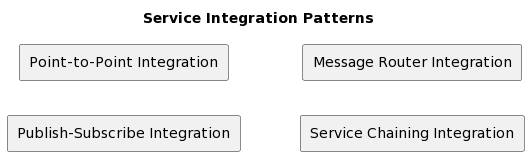
The following are some of the most common service integration patterns that can be used in this context:
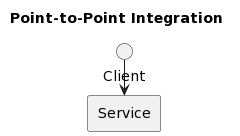
Point-to-Point Integration
This pattern involves connecting two services directly using a single connection. It is the simplest form of service integration and is suitable for small-scale systems.
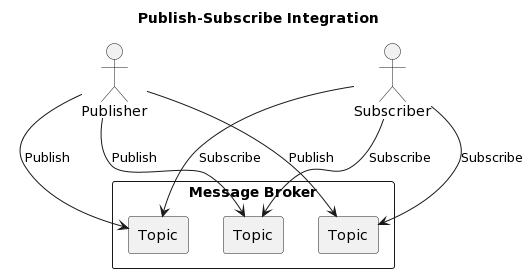
Publish-Subscribe Integration
In this pattern, a publisher service sends messages to multiple subscriber services. This pattern is useful in situations where multiple services need to receive the same message.
Message Router Integration
This pattern involves using a message router to route messages between services. It is a flexible and scalable pattern that can be used in complex systems.
Service Chaining Integration
In this pattern, multiple services are connected in a chain, where the output of one service becomes the input of the next service. This pattern is useful for implementing complex business processes.
Benefits of Service Integration Patterns with CapBPM and Camunda Cloud
Using service integration patterns with Camunda Cloud offers several benefits, including:
Improved Productivity
Service integration patterns help streamline business processes and eliminate manual intervention, resulting in improved productivity.
Scalability and Flexibility
CapBPM and Camunda Cloud provide scalability and flexibility, making it easy to scale systems up or down based on changing requirements.
Reduced Complexity
Service integration patterns provide a standard approach for designing and implementing service-oriented architecture solutions, reducing complexity and improving maintainability.
Conclusion
Service integration patterns with Camunda Cloud are essential for organizations looking to streamline their business processes and enhance productivity. The use of these patterns provides a standard approach for designing and implementing service-oriented architecture solutions, resulting in improved scalability, flexibility, and reduced complexity.
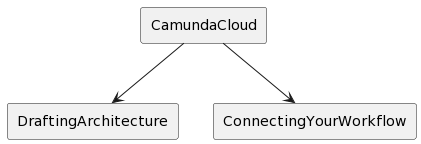
At CapBPM, we have extensive experience in Camunda Cloud architecture design and implementation. We understand the importance of connecting the workflow engine with your world, and have developed best practices for doing so. In this article, we will share our insights and strategies for drafting your Camunda Cloud architecture and ensuring seamless integration with your existing systems.
Camunda Cloud Architecture
The Camunda Cloud architecture is a cloud-native workflow engine that allows our clients to model, execute, and optimize their business processes. It offers a variety of features, including process modeling, task management, and user management. In addition, it provides advanced analytics and monitoring capabilities to help our clients gain insights into their processes and identify areas for improvement.
Drafting Your Camunda Cloud Architecture
Drafting your Camunda Cloud architecture requires careful planning and consideration. Here are some best practices that we recommend our clients to follow:
Define Your Business Processes: Before drafting your Camunda Cloud architecture, it is important to define your business processes. This includes identifying the tasks, decisions, and interactions that make up your workflows.
Identify Your System Requirements: Once our clients have defined their business processes, they need to identify the system requirements for their Camunda Cloud architecture. This includes evaluating the scalability, availability, and security of their systems.
Design Your Architecture: With your business processes and system requirements in mind, you can now begin designing your Camunda Cloud architecture. This includes defining the components, services, and interfaces that will make up your system.
Integrate with Existing Systems: To ensure seamless integration with your existing systems, it is important to design your Camunda Cloud architecture with these systems in mind. This may involve developing custom integrations or using pre-built connectors.
Optimize for Performance: To ensure optimal performance, you should design your Camunda Cloud architecture with scalability and efficiency in mind. This includes optimizing for speed, memory usage, and other performance metrics.
Connecting Your Workflow Engine with Your World
Connecting your workflow engine with your world requires careful consideration of your existing systems and infrastructure. Here are some best practices that we recommend our clients to follow:
1. Use APIs: APIs are a powerful tool for connecting your workflow engine with your world. They allow our clients to expose their workflows as REST APIs, making it easy to integrate with other systems.
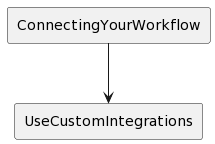
2. Use Custom Integrations: In some cases, custom integrations may be necessary to connect your workflow engine with your world. This may involve developing custom code or using pre-built connectors.
3. Monitor and Optimize: To ensure optimal performance, it is important to monitor and optimize your integrations. This includes tracking performance metrics and identifying areas for improvement.
Conclusion
Drafting your Camunda Cloud architecture and connecting your workflow engine with your world requires careful planning, consideration, and optimization. Our clients has succeeded in designing high-performing, scalable, and efficient architecture that seamlessly integrates with their existing systems. Implementing these practices can help you too.
In this post, I’ll be walking you through the process of adding a Javascript engine to Camunda. We’ll start by understanding the Camunda architecture and setting up a development environment. Next, I’ll guide you through writing the Javascript engine, integrating it with Camunda, and enhancing it. By the end of this post, you’ll have a good understanding of how to add a Javascript engine to Camunda.
Setting up the Development Environment
Installing Camunda
To get started with Camunda, you’ll need to have a working installation. Camunda can be installed on various operating systems, including Windows, Mac, and Linux. There are several ways to install Camunda, including using a Docker container, installing it locally, or deploying it to a cloud platform. You can find detailed instructions for each installation method on the Camunda website.
Understanding the Camunda Architecture
To understand how to add a Javascript engine to Camunda, it’s important to understand the architecture of the platform. Camunda is built on a modular architecture that allows you to add custom components and extend the platform’s capabilities. The core components of Camunda include the Camunda Modeler, the Camunda Engine, and the Camunda REST API. The Camunda Modeler is used for designing workflows, the Camunda Engine is responsible for executing workflows, and the Camunda REST API is used for communicating with the Camunda Engine.
Setting up a Development Workspace
To add a Javascript engine to Camunda, you’ll need a development workspace. You can set up a development workspace using any code editor or Integrated Development Environment (IDE) of your choice. Some popular options include Visual Studio Code, IntelliJ, and Eclipse. I recommend using Visual Studio Code for this project, as it is a lightweight and powerful code editor that is well suited for developing Camunda applications.
Importing the Camunda BPM Library
Camunda provides a Java library that can be used to interact with the Camunda Engine. You’ll need to import this library into your development workspace in order to add a Javascript engine to Camunda. The library can be found on the Camunda website, and you can use a build management tool like Maven or Gradle to import it into your project.
Setting up a Camunda Project
Now that you have a development workspace set up and the Camunda BPM library imported, you can set up a new Camunda project. To do this, create a new Java project in your development workspace and import the Camunda BPM library. You should also create a new class that will be used to implement your Javascript engine.
Implementing the JavaScript Engine in Camunda
Once you have set up your environment and have your JavaScript code ready, it’s time to integrate it into Camunda. This process will involve a few steps:
Register the JavaScript Engine
The first step is to register the JavaScript engine with Camunda. You can do this by creating a custom plugin that extends the Camunda engine. This plugin should implement the org.camunda.bpm.engine.impl.scripting.ScriptEngine service and declare the JavaScript engine as its implementation. You can then register this plugin in the Camunda engine configuration file.
Create a Custom Task
Next, you need to create a custom task that will use your JavaScript engine. To do this, you will need to extend the org.camunda.bpm.engine.delegate.JavaDelegate class and implement the execute() method. In this method, you can retrieve the JavaScript code from your script file and execute it using the registered JavaScript engine.
Deploy the Process Definition
Finally, you need to deploy the process definition that includes your custom task. You can do this by creating a BPMN process definition file and deploying it to the Camunda engine using the Camunda REST API or the Camunda Tasklist.
Once you have completed these steps, you can test your JavaScript engine in Camunda by starting a process instance and checking the output of your custom task. If everything is working correctly, you should see the output of your JavaScript code in the Camunda Tasklist or the Camunda Cockpit.
In conclusion, adding a JavaScript engine to Camunda is a straightforward process that can greatly enhance the functionality of your Camunda BPMN processes. Whether you need to access external APIs, perform complex calculations, or interact with other systems, integrating a JavaScript engine into Camunda can help you achieve your goals. With a little bit of setup and implementation, you can start using JavaScript in Camunda today!
Deploying the JavaScript Engine in Camunda
Once we have implemented the JavaScript engine in Camunda, we need to deploy it in the Camunda environment. Here are the steps to do that:
Copy the compiled JavaScript engine jar file to the Camunda lib directory.
Add the engine configuration to the Camunda configuration file (camunda.cfg.xml). The configuration file should include the following properties:
Engine name
Engine class
Engine configuration URL
Engine configuration file name
Restart the Camunda engine after adding the engine configuration to the configuration file.
Test the JavaScript engine by executing a BPMN process that has a script task that uses the JavaScript engine.
If the JavaScript engine is working as expected, we can deploy it to a production environment.
To deploy to a production environment, we need to perform the same steps as in a development environment, but with additional security and performance considerations in mind.
In conclusion, adding a JavaScript engine to Camunda is a straightforward process that involves writing the JavaScript engine code, compiling it, deploying it in the Camunda environment, and testing it. With a few modifications, we can use the same JavaScript engine for multiple Camunda projects, saving time and effort in the long run.
Testing and Debugging the JavaScript Engine in Camunda
After deploying the JavaScript engine in Camunda, we need to test it to ensure that it is working as expected. Here are the steps to test and debug the JavaScript engine:
Execute a BPMN process that has a script task that uses the JavaScript engine.
Verify that the script task is executed correctly and produces the expected output.
If the script task does not produce the expected output, we need to debug the JavaScript engine code.
Camunda provides a debugging interface in the Camunda Tasklist that allows us to inspect the script task execution, variables, and outputs. We can use this interface to debug the JavaScript engine.
If we are unable to resolve the issue with the Camunda Tasklist debugging interface, we can also use the Camunda Cockpit to inspect the script task execution, variables, and outputs.
In addition to the Camunda debugging interfaces, we can also use a standalone JavaScript debugger, such as the Chrome DevTools or Firebug, to debug the JavaScript engine.
If the issue still persists after using the Camunda debugging interfaces and a standalone JavaScript debugger, we can log the execution of the script task and the values of the variables and outputs.
Once the issue is resolved, we need to repeat the testing process to verify that the JavaScript engine is working correctly.
In conclusion, testing and debugging the JavaScript engine in Camunda is a critical step in ensuring that the engine is working as expected. Camunda provides several debugging interfaces and tools that allow us to debug the JavaScript engine effectively. Additionally, logging the execution of the script task can also help us identify and resolve issues with the JavaScript engine.
Integrating JavaScript with Camunda
In this part, I’ll walk you through the process of integrating your custom JavaScript engine with Camunda. This integration is crucial to make sure that Camunda can execute your JavaScript expressions correctly and the correct runtime environment is used.
To integrate your JavaScript engine with Camunda, you need to implement the org.camunda.bpm.engine.impl.scripting.ScriptEngine interface provided by Camunda. This interface requires you to implement a few methods such as eval, execute, setScriptEngineFactory, and unsetScriptEngineFactory.
The eval method is used to evaluate a single JavaScript expression and return the result. The execute method is used to execute a full JavaScript script, which may contain multiple statements. Both of these methods should return the result of the JavaScript expression or script.
The setScriptEngineFactory method is used to set the org.camunda.bpm.engine.impl.scripting.ScriptEngineFactory for your custom JavaScript engine. This factory is responsible for creating instances of your custom JavaScript engine for use in Camunda. The unsetScriptEngineFactory method is used to unset the script engine factory and remove it from Camunda.
Once you have implemented the ScriptEngine interface, you need to register it with Camunda. To do this, you can add a file named org.camunda.bpm.engine.impl.scripting.ScriptEngine to the META-INF/services directory in your classpath. This file should contain the fully-qualified name of your custom JavaScript engine class.
At this point, your custom JavaScript engine should be fully integrated with Camunda and ready to use. To test the integration, you can create a process definition that uses JavaScript expressions and verify that they are executed correctly by your custom JavaScript engine.
In conclusion, integrating a custom JavaScript engine with Camunda is a straightforward process that involves implementing the ScriptEngine interface and registering it with Camunda. With this integration in place, you can use your custom JavaScript engine in your Camunda processes and take advantage of the powerful scripting capabilities that it provides.
Testing and Debugging Your JavaScript Engine
Once you have completed all the previous steps, it’s time to test your JavaScript engine to make sure everything is working as expected. Before you start testing, it’s important to have a clear understanding of what you want to achieve with your engine and what kind of behavior you expect from it. This will help you to determine whether your implementation is correct or if there are any bugs that need to be fixed.
There are several ways to test a JavaScript engine, including manual testing and automated testing. In manual testing, you will execute your engine in a test environment and observe its behavior. This approach is useful when you need to test specific scenarios or edge cases. On the other hand, automated testing is more efficient and less prone to human error. You can write test cases that will execute your engine automatically and check whether it produces the expected results.
Debugging is another important step in testing your JavaScript engine. If you encounter any issues or errors, you need to be able to diagnose the root cause and fix the problem. One way to debug your engine is to use the built-in debugger in your development environment. You can set breakpoints, inspect variables, and step through your code to see what’s happening at each stage.
Another way to debug your engine is to log messages to the console. By logging messages, you can see what’s happening inside your engine and diagnose any issues. This approach is particularly useful when you’re working with complex systems or when you need to track down hard-to-find bugs.
In conclusion, testing and debugging your JavaScript engine is a critical step in the process of adding it to Camunda. By testing your engine, you can ensure that it works as expected and that it produces the desired results. Debugging is also important to help you identify and fix any issues that may arise during the testing process. With these tools and techniques at your disposal, you can make sure that your JavaScript engine is fully functional and ready to be used in your Camunda applications.
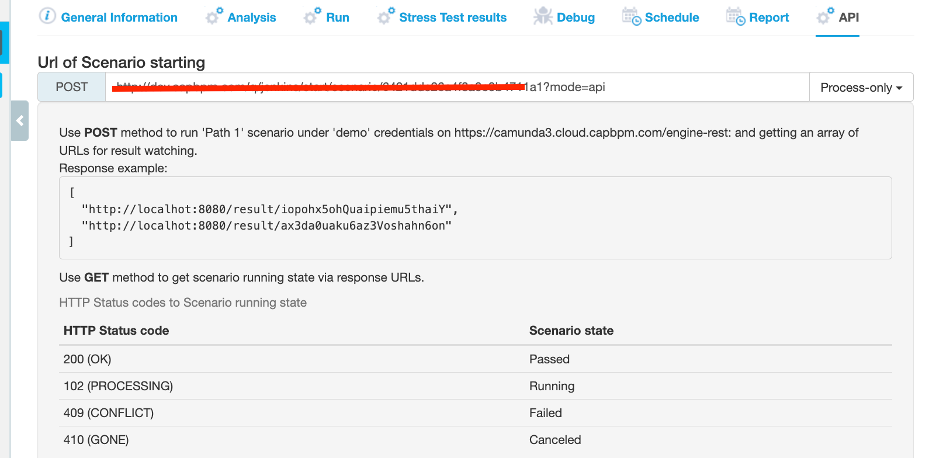
Sentinel From Capital BPM can test both your Camunda 7 and Camunda 8 processes.
In today’s highly competitive business landscape, organizations are constantly striving to optimize their processes and workflows. Rapid process development and continuous improvement have emerged as critical methodologies to achieve operational excellence, increase efficiency, and gain a competitive edge.
In this article, we will explore the principles of rapid process development and continuous improvement, along with techniques and tools that can help your organization excel in these areas.
Getting Started
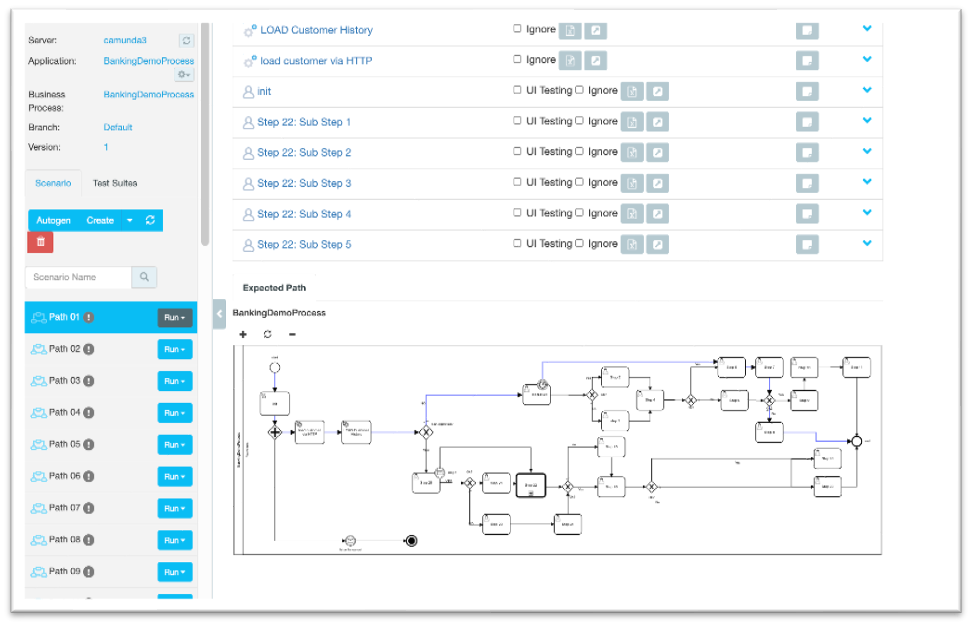
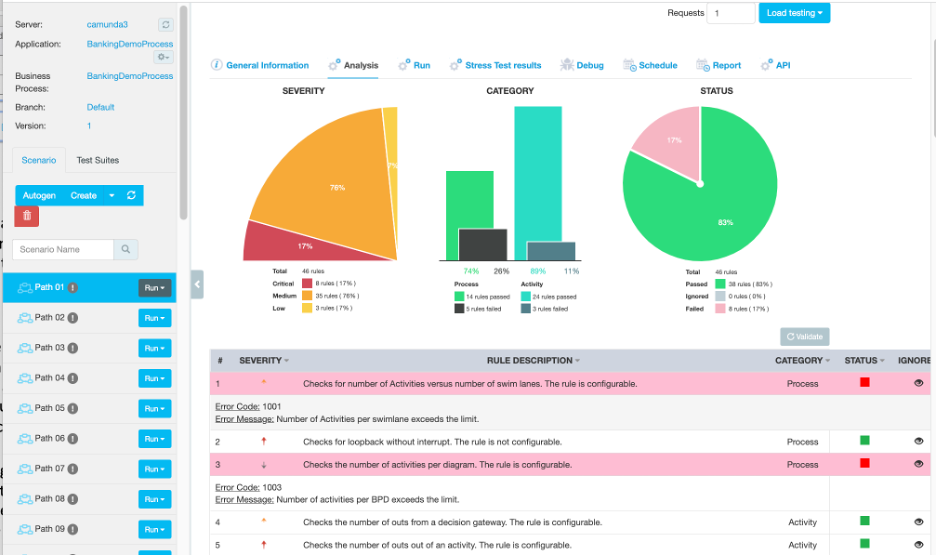
Sentinel, an innovative product for process optimization from Capital BPM, offers a comprehensive mapping solution for Camunda processes. By meticulously charting all possible paths, including Timers, Events, sub-processes, and loops, Sentinel enhances process efficiency and ensures a streamlined workflow. Utilizing advanced algorithms, Sentinel’s powerful mapping capabilities empower businesses to identify bottlenecks and drive continuous improvement. Experience unparalleled control and visibility over your Camunda processes with Sentinel’s robust mapping features. Elevate your organization’s process performance and achieve operational excellence with the cutting-edge Sentinel solution.
Exploring Every Path
Sentinel revolutionizes BPMN process management by mapping out and highlighting every possible path within your workflows. With its intelligent visualization capabilities, Sentinel enables you to gain deeper insights into your processes, identifying potential bottlenecks and areas for optimization. By illuminating the intricacies of your BPMN processes, Sentinel helps drive informed decision-making and promotes continuous improvement for your organization.
Testing Rules
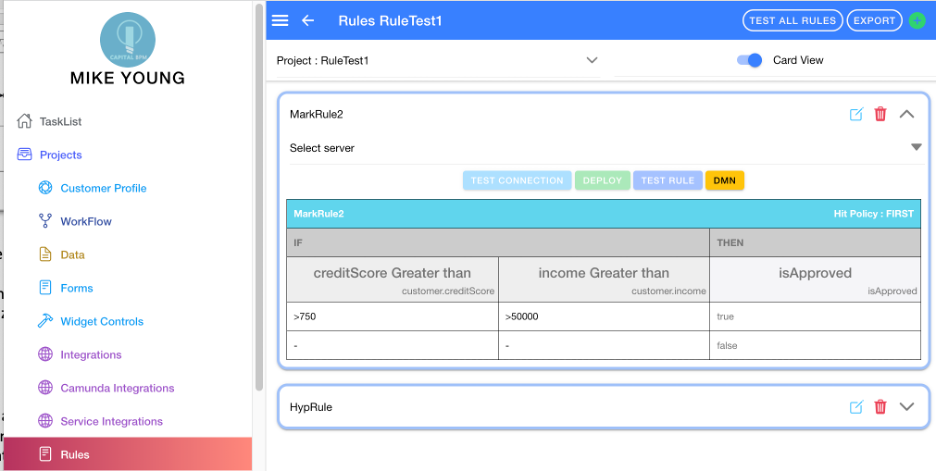
Sentinel goes beyond traditional process mapping by enabling thorough testing and exercising of Rules and DMN (Decision Model and Notation) within your workflows. This powerful functionality ensures that your business rules and decision-making logic are accurate and efficient. With Sentinel’s comprehensive testing capabilities, you can confidently optimize your processes, enhance decision-making, and promote overall operational excellence.
Testing
Sentinel pioneers Test-Driven Development (TDD) within the BPMN landscape, offering a powerful approach to process design and optimization. By placing testing at the forefront, Sentinel ensures that processes are rigorously validated and refined before implementation. Embracing TDD with Sentinel allows organizations to develop more robust and efficient BPMN processes, ultimately driving greater operational excellence and business agility.
Setting Data
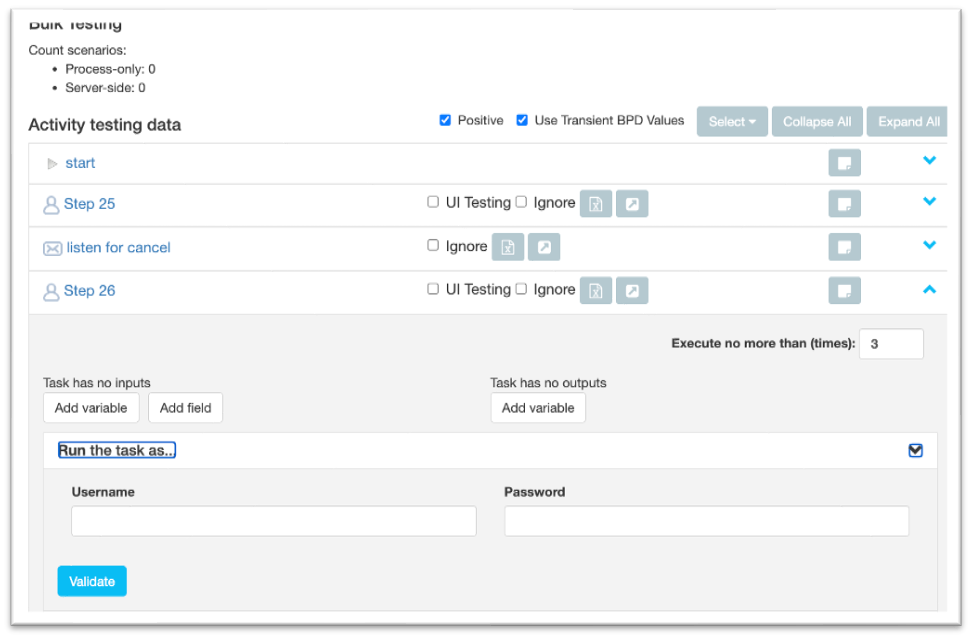
Sentinel’s advanced capabilities allow you or the integrated AI to generate a wide range of test data, encompassing both simple and complex scenarios. This versatile approach to data generation ensures comprehensive testing of your processes, uncovering hidden issues and potential improvements. By leveraging Sentinel’s powerful data generation features, you can optimize your workflows and achieve the highest level of process performance and efficiency.
Overriding Timers
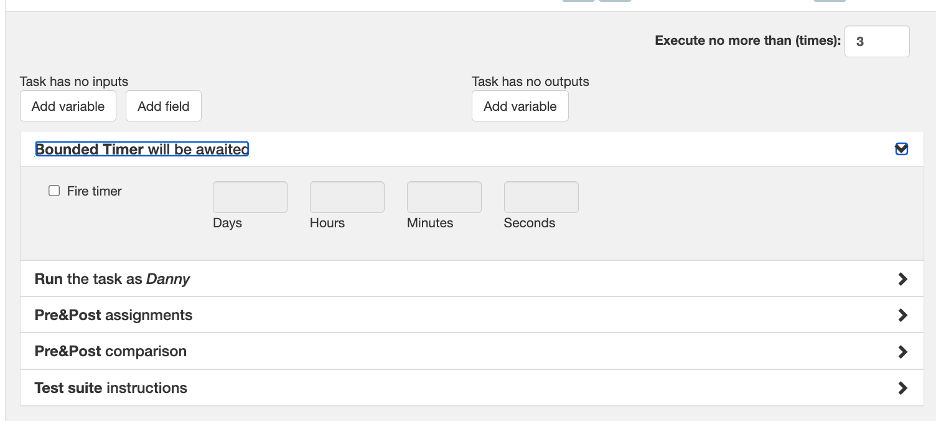
Sentinel’s advanced capabilities enable you to override your processes’ timers, providing unparalleled control over workflow execution. By adjusting timer settings, you can fine-tune process performance, simulate different scenarios, and identify potential bottlenecks. Sentinel’s timer override feature empowers organizations to optimize their processes and achieve the desired balance between efficiency and flexibility.
Testing Connectors
Sentinel offers comprehensive testing capabilities for both internal and external connectors, ensuring seamless integration with Camunda 7 or Zeebe. By thoroughly evaluating the performance and reliability of your connectors, Sentinel helps maintain smooth communication between your processes and external systems. With Sentinel’s robust connector testing features, you can confidently optimize your workflows, enhance interoperability, and drive overall process efficiency.
Integrating with CI/CD
Sentinel seamlessly integrates with CI/CD pipelines, streamlining your process development and deployment workflows. By incorporating Sentinel into your continuous integration and continuous delivery strategy, you can ensure that process improvements are automatically tested, validated, and deployed in a timely manner. This harmonious integration enables organizations to accelerate process development, reduce deployment risks, and maintain a consistent level of process performance and efficiency.
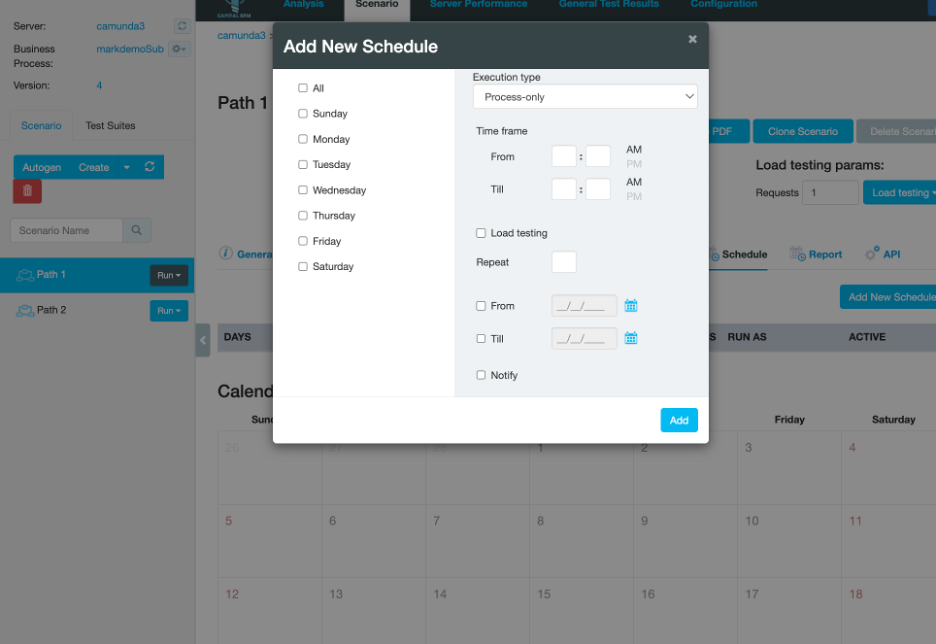
Scheduling Tests
With Sentinel’s intuitive scheduling features, you can easily plan and automate the execution of tests at specific intervals. This streamlined approach ensures consistent evaluation of your processes, identifying potential issues and areas for improvement. By automating test schedules using Sentinel, organizations can save time, maintain high-quality processes, and focus on driving continuous optimization and innovation.
Rapid Process Development: Key Principles
Rapid process development focuses on accelerating the design, implementation, and iteration of business processes. Here are the key principles that guide this approach:
Collaborative Design: Involve cross-functional teams in the process design to ensure that all stakeholders have a say in shaping the process, leading to more effective and efficient outcomes.
Iterative Development: Break down the process development into smaller, manageable steps, allowing for quicker feedback and adjustments.
Standardization: Implement standardized procedures and frameworks to reduce complexity, minimize errors, and ensure consistency across the organization.
Measurement and Analysis: Continuously monitor process performance using key performance indicators (KPIs) and analyze the data to identify areas for improvement.
Continuous Improvement: A Never-Ending Journey
Continuous improvement is an ongoing process that involves regularly evaluating and refining your organization’s processes to enhance efficiency and effectiveness. The following strategies can help facilitate a culture of continuous improvement:
Embrace a Growth Mindset: Encourage employees to view challenges as opportunities for learning and growth.
Reward Innovation: Recognize and reward employees who contribute to process improvements, fostering a culture of innovation.
Frequent Feedback Loops: Establish regular communication channels for feedback on processes and workflows, ensuring that employees can voice their ideas and concerns.
Establish Metrics: Define clear and measurable KPIs to track process performance and guide improvement efforts.
Techniques for Streamlined Process Development
Implementing these techniques can help streamline process development and facilitate continuous improvement:
Business Process Modeling Notation (BPMN): Utilize BPMN to visually represent processes, making it easier to understand, design, and communicate workflows.
Value Stream Mapping: Identify areas of waste and inefficiencies by mapping out the entire process from start to finish, enabling targeted improvements.
Agile Methodologies: Adopt agile methodologies like Scrum and Kanban to encourage iterative development, collaboration, and flexibility in process design and execution.
Kaizen: Implement the Japanese concept of Kaizen, which emphasizes small, incremental improvements that accumulate over time to yield significant results.
Tools and Technologies to Enhance Your Process Efficiency
Leveraging the right tools and technologies can significantly improve your process development and continuous improvement efforts. Some of the most effective solutions include:
Business Process Management (BPM) Software: Continue Utilize BPM software to model, automate, and optimize your business processes. These tools provide a centralized platform for managing and monitoring workflows, ensuring process consistency and efficiency across the organization.
Workflow Automation Tools: Implement workflow automation tools to reduce manual tasks, minimize errors, and streamline processes, freeing up employees to focus on more value-added tasks.
Data Analytics and Visualization Platforms: Leverage data analytics and visualization platforms to gain insights into process performance, identify bottlenecks, and inform continuous improvement efforts.
Collaboration and Project Management Tools: Adopt collaboration and project management tools to facilitate communication and coordination among cross-functional teams, fostering a collaborative and agile approach to process development.
Conclusion
Rapid process development and continuous improvement are essential methodologies for organizations seeking to optimize their processes, increase efficiency, and maintain a competitive advantage. By implementing key principles, techniques, and tools, your organization can accelerate process development, foster a culture of continuous improvement, and ultimately achieve operational excellence. Stay ahead of the curve by embracing these best practices and leveraging the right technologies to support your process improvement efforts.
Microservice orchestration is something that we all have to do in the enterprise space. Whether you’re using something like Camunda, Kafka, Temporal, or a million other things, you have to have a way for one system to call to another, deal with exceptions and timeouts, escalations retry, throughput, logging and security, multi-tenancy, and more. You have to solve that problem.
Now, are you going to solve that problem with a home brew solution or are you going to use an off the shelf product for that? And this, I think, is sort of a fundamental perspective that we need to be thinking about. There are places where I think a home brew solution makes sense. So if you are doing something super idiosyncratic to your industry and you’re using your own proprietary protocol, I can imagine that an off-the-shelf engine wouldn’t necessarily work for you. But for the most part, the majority of us don’t live in that space.
The majority of us are trying to do fairly conventional things. We want to make a restful call here, make a GRPC call there. We want to talk to the database, get some information, log all of it, encrypt it, and update this other data source. For that purpose, you can either write custom code: If “x” happens, then do “y” unless there’s a timeout, and then escalate and send it to this email, and so on and so forth.
Or you can use a microservice orchestration engine. Now, of the microservice orchestration engines that are out there, you can take something like Kafka, build logic around it and establish your own message protocols and use that as a mechanism to transport messages back and forth.
But you still have to build logic, NEM, and even pseudo grammar around that, right? So when we put messages in the Kafka queue, we do this, we do that, and so on and so forth. Or you can go hardcore. You can write IF statements that are nested. “Hey, if this happens, unless this time’s out, retry three times,” and so on and so forth inside of your code.
Or you can use some kind of a workflow engine. The idea of the workflow engine, or languages that are specific and targeted for solving this particular problem, make a lot of sense in the same way in that using something like SQL makes a lot of sense when you’re dealing with data access. This is because it’s not a generic problem, it’s very specific to a particular type of adventure that we’re on. It makes sense that you would want to be looking at a specialized tool for that – just like the carburetor in your car is a specific tool that does a very specific functionality. You don’t want to have to go out and rebuild a carburetor every time you want to drive to the grocery store. That’s where these engines come in. At the end of the day, you’re better off using a tool than banging two sticks together in order to make fire.
Cap’s Loyalty to Camunda
My loyalty to Camunda is based explicitly and only on its excellence. If it were another company that was excellent in this field, that’s the one I’d be working with, but I’ve worked with IBM, Pega, and Appian. I’ve done a lot of different stuff in this space, and from a pure performance perspective, I don’t know of any engines out there — any service orchestration engines — out there that are better than Camunda. What I like about it is that it’s open source, so if you want to take on the feeding and the maintenance of it, you can do that and you don’t have to work with a vendor.
At the same time, there are SaaS offerings for it offered by Camunda — especially with Camunda 8 — where they say, “Hey, we’ll take on the infrastructure and the security, and you just write your workflows and your processes.” At the end of the day, the majority of the people who work in this space need to solve fairly common problems, but just because they’re common doesn’t mean that they’re easy. Our ability to be able to articulate our problem and our ability to be able to articulate the solution for that problem in a notation specifically designed for that just makes a lot of sense.
I also like the visuals. I like seeing this step go to this step and then go to this step. I like it because I can go to my business partner and go, “Hey, is this right? Am I doing this right?” This is because they know the business side, I know the technical side, and the pictures help us draw that together. I also like the fact that when it is explicitly drawn out, then my technical teams have more clarity in terms of how to manage it, how to change it, what the side effects are, and how to version it. Everything you need is right there. Now, we can focus our energies on how to do an efficient read from a database, what the business logic rules are that we need to implement as opposed to the metadata, and how we’re going to define all of this.
There are tools out there like Temporal, which I think is an exciting tool in the space, but fundamentally, it is a code-based platform as opposed to a visual platform. I fundamentally believe that there’s a finite number of things that you can keep track of in your head when you’re looking at it from a code perspective. For example, most people can bring up an image of the Mona Lisa in their mind, but you’re gonna have a hard time remembering 50 pages of Shakespeare, verbatim. Code and text is harder when it gets complex, where diagrams and images are how our brains are wired. We’re hunter gatherers. We think in terms of visuals and the ability to distinguish differences and colors. So, with all that said, the ability to deal with encroaching complexity is better dealt with with a diagram-based tool than a code-based tool.
Validating Camunda’s Ability to Help
You have to have a high standard. You should always be thinking days and weeks, not weeks and months. You should say, “Hey, I have a test case. I want to make a call to these three restful services, I want to deal with timeouts, escalations, and routing roles, and I want to get this done in two weeks. That is an empirical test that is not subjective. You could actually do that. The trick is going to be making sure that you have somebody to help you.
Whether it’s a partner like Capital BPM or some expert that you know out in the wild, bring in someone who knows how to drive this car so you get the experience of what it’s like if you had this car. You will get there by just figuring out the technology yourself, but you’re not gonna know it on Day 1. But that’s not the important thing. The important thing is to have this vehicle cover the terrain that you need to cover in the time that you need, plus the safety and the security that you need. That is an empirical question, and engineers love empirical questions because we don’t have to argue. We can just see what happens.
I love that approach. I love it philosophically and I love it practically. I would recommend, you know, come up with a use case where you want to do specific tasks and then start the timer. How long is it going to take you to do these things? Is it worth it? It is better to get someone who knows how to do it and see if that works for you. Be empirical.
Overcoming Camunda’s Biggest Weakness
Like all technologies, Camunda has its weaknesses. The main weakness is going to be the fact that it is a different paradigm than what your normal techies are used to. You’re drawing diagrams as opposed to writing code and that is, a fundamental paradigm shift for your traditional programmers. If they can understand, and adapt to the fact that Camunda is the orchestration engine, it acts like a conductor in an orchestra. It will say a little more violin, a little bit more cello, and whatnot. If they understand that, that’s what Camunda does for them.
The things that they’re doing — talking to the database, making a restful call, updating the Kafka queue — those things can still be written in traditional code. You can focus on the excellence of your development team on those atomic tasks. Then let Camunda compose them into a hole. That is the strength and the weakness of it. That is also the place where, from a mindset perspective, where you need the most flexibility. I would say that can definitely be a challenge.
Where Capital BPM Steps In
Typically what we do is we help customers come up with a valid challenge. Within a certain amount of time — both from a development amount of time and an execution amount of time — we help them articulate the problem, and then we help them come up with an objective test that determines whether it’s possible to do this or not. And again, this can be a matter of weeks.
In those weeks, we should be able to build a proof of concept that shows you whether it’s possible to do this or it’s not possible to do. Camunda is not a silver bullet. There are no silver bullets, which is a sad state of affairs, because there are monsters out there. But even as we need to be able to slay these monsters, there are practical things that we can do, and some of these practical things are just a matter of trying it out, seeing if it works, and taking notes on what happened. And that’s where CapBPM can help. We know this technology very well; you know your business domain very well. We can put those together and figure out if this is a useful tool for you or not.
What are some challenges that I’m likely to face when trying to deliver my first command to project?
Generally speaking, when you are doing a BPM or process orchestration project, the hard part is not articulating out the steps like your business people, your IT people, they know what those should be. The hard part is the nitty gritty of actually talking to the integration steps, like, for instance, you’ll wanna make a restful call, but there’ll be some weird thing in the header and you won’t be able to call it. The team that’s responsible for that won’t be able to meet with you until, let’s say for example, next Tuesday. When you do, they’ll give you a token. You’ll try, and it doesn’t work because you’re in the wrong environment. That kind of stuff drives you nuts. Integrations are hard and they’re hard because they’re imprecise, so the pain is going to be in the nuts and bolts of actually talking to those external systems. Seems like it should be easy, but it’s always painful. Therefore, that’s the place that I would start.
Now, typically what I do of my projects, is I will always stub those out. If there is an APIM system in place like an Apigee, MuleSoft, Kafka or something else, I will use that and I will stub out a restful API call. Then I’ll let the Java folks, .net folks, or whoever, figure out the mechanics. When that’s done, I’ll turn the sprocket and I’ll actually get the payload that I expect. If that’s not in place, then I’ll put in essentially stub, so instead of calling the service to say, “Get a customer from the database”, I’ll actually say, “Hey, what does the customer look like? What does the stub look like?” I will hard code that while the rest of the team is dealing with the technical difficulties of making that integration work.
The reason that I do that is because if I’ve got a 10 step process and the very first step requires that I load a customer, I don’t want to be stopped on working on the rest while this problem gets trafficked. I’ll just take “John Smith” as a customer, and for example, we know that he has 17 fields. (first name, last name, age, etc.) We’ll use that to drive the process. In the meantime, I’m going to have one of my smart guys figuring out why this restful API call doesn’t work. That allows us to make progress on the process side while concurrently working on progress. On the technical integration side, one of the ancillary benefits is that when you’re doing testing, you know how much of your time is being spent on the process and how much of it is being spent on the integration.
How do you know that the payloads will have fidelity and really be true to what you need?
You can imagine a scenario where we have a customer that’s coming back and we expect the last name field to be named, “last name,” but really in the database, it’s called “surname.” When we actually make the thing work, it breaks because we were expecting last name and we got “surname,” and our code doesn’t know how to deal with it. There is no way to know that every single time off the bat.
However, I submit that it doesn’t matter. I submit because the cost of integration is cheap due to the fact we’re stubbing it out. Actually making the change from “last name” to “surname” to “middle name” is something that we can evolve on. These are problems that you can negotiate and that you can solve as you’re going through the system. The trick, as always in the enterprise space for the last 15 to 20 years, is iteration. You do it again. You make some mistakes, shake yourself off, and you do it again, and you make it better, right?
You’ve gotta embrace that philosophy. You deal with a customer and they have 17 fields, and maybe you get six of them wrong. That’s okay. Move forward with what you can, and then fix the other parts of this that is the heart of what I call “shark architecture.” And to me, “shark architecture” means that like a shark, you have to swim in order to be able to breathe. You have to move forward. There is no stopping. We don’t assume that we don’t know what to do because the team is not done with whatever they are dealing with. That doesn’t happen on the projects where I’m involved and I get to keep my sanity.
With all that being said, I would say make some mistakes. Go forward, come back, iterate on it, make it better and better. This isn’t just for delivery, this is for post-delivery. We expect processes to be provable. We expect to be able to make changes, right? We need to work out our discipline and our cadence for how we incorporate change into what we’re doing. The big mantra of Agile programming has always been embrace change. Let’s do that, right? Let’s do this thing that we’ve been talking about all this time. I’m a big proponent of this. Just get in there, get stuff done, make some mistakes, learn from them, and do it better.
How do I deal with the fact that in the real world there’s gonna be a lot of variation of the nature of the data and your approach might lull us into a sense of complacency?
You need synthetic data that is auto-generated by an AI. It is fair to say, for example, that we’re going to bring back “John Smith” and he is going to be a specific payload, but it’s incredibly easy now to say, “Hey, we’re going to bring back one of random 20 customers. One will be John Smith and one will be Joan Stevenson, and so on and so forth.” The data variance can be dynamically changed by an AI. It’s synthetic data that you described using a grammar, and there are open source tools that can do this for you. You can talk to your favorite AI tool. They can do this for you, or you can just code it up. This is not going to be one hundred percent. It’s not going to cover you for every variation, but it is better than nothing.
Remember, we need to move, we need to make progress. I would much rather have a process that breaks when there is no customer identification number than have a process that hasn’t even been implemented because we’re waiting for everything to be perfect.
Leading Shipping & Logistics Company The client operates an extensive network of distribution hubs, warehouses, and transportation routes. Their operations involve complex workflows, including traffic flow management, labor allocation, and compliance with diverse regional regulations. As part of their modernization initiative, they sought to automate their billing and invoicing processes while optimizing operational efficiency.
Challenge
Several Challenges Faced Inaccurate Billing: Manual processes led to frequent errors in invoices for drivers, dock workers, and temporary staff, causing disputes and delayed payments. Inefficient Traffic Flow: Congestion at distribution hubs resulted in delays and reduced throughput. Complex Cost Allocation: Assigning costs for labor, equipment, and interrupted services was labor-intensive and lacked transparency. Regulatory Compliance: Ensuring adherence to state-specific and federal logistics regulations required significant manual effort and frequent audits. Solution
Implementation of a Integrated, Technology-Driven Solution To address these challenges, the client implemented an integrated, technology-driven solution focused on mobile tracking, activity-based costing, and compliance automation. The key components of the solution included:
Mobile Tracking Integration A mobile tracking system was developed and integrated with the client’s Transportation Management System (TMS). This allowed for real-time monitoring of vehicles, equipment, and labor activities. Key features included:
Dynamic Traffic Flow Management: Optimized inbound and outbound traffic patterns to reduce bottlenecks and improve turnaround times at distribution hubs. Geo-Fencing for Task Allocation: Ensured tasks and costs were allocated based on geographic locations, complying with local regulations. Real-Time Notifications: Provided instant alerts for disruptions, such as vehicle breakdowns or weather-related rerouting, enabling proactive adjustments.
Activity-Based Costing An advanced activity-based costing model was implemented to improve billing accuracy. Features included:
Labor Cost Tracking: Monitored hours and tasks completed by drivers, dock workers, and temp staff. Equipment Utilization Metrics: Calculated costs for forklifts, trailers, and other equipment based on usage and depreciation. Dynamic Invoice Adjustments: Automated adjustments for interrupted services, such as partial deliveries or delays, with detailed breakdowns for clients. Compliance and Audit Automation The solution ensured full compliance with labor and logistics regulations while reducing the administrative burden of audits:
Billing Reconciliation: Generated detailed audit trails for all tasks and expenses, improving transparency. Regulatory Adherence: Automatically adjusted workflows to comply with hours-of-service (HOS) rules and other relevant regulations. Compliance Reports: Delivered real-time reports to internal and external stakeholders, reducing manual intervention. Result
Significant Operational and Financial Benefits Optimization efforts resulted in licensing costs reduced.
System became more efficient, cost-effective, and easier to manage.
Automation goals were achieved, improving the overall workflow and adherence to regulations.