








Top five things you need to know about Archiving with Camunda

Top five things you need to know about Archiving with Camunda

The ability to archive a Camunda application allows for the definition of multiple deployments (process archives). This ability helps make sure that all needed deployments are performed upon deployment of your application.

In this Podcast episode, Stuart and Max explore the 5 things that you need to know about Archiving with Camunda when using the open-source Camunda Platform, an Enterprise Platform for Workflow and Decision Automation.

https://1c6dba4e-4803-4443-a0a9-c9b19dea5066.usrfiles.com/html/db9376e69cfa487ea0fa0b912ae51a4f_v1.html

What is the context here?

The context here is that you’re ready to deploy your Camunda application to production, but it’s your first time, and you’re wondering how to archive historical data. So that’s what we’re going to talk about today: the care of feeding of Camunda’s archival data.

Why do you need to do archiving at all with Camunda?

Camunda tracks all sorts of information about your processes, tasks, workflows, integrations, decisions, start times, end times, execution, delays, etc. That data is critical to your business, and it cannot be lost under any circumstances. So, while design considerations must take Camunda runtime performance into account, they must also ensure that data loss doesn’t occur.

If you don’t archive that information and do so carefully, you’re likely to lose it: worse, you could cause a production failure if those tables grow unchecked. That’s because the system was designed to be archived, and will 100% break if you don’t do it.

What does this mean at a tactical, hands-on-keyboard level? How do you get started?

You would typically write a Custom History Event Handler. A Camunda History Event Handler can read, echo, and even scrub HistoryEvent (history events) instances in an easily customizable way. For example, if you can have a custom history event handler that will *asynchronously* transmit history events to some kind of Queue, like Kafka, from which they can then be disseminated via subscriptions to any system that needs that data. Those subscribers can then slice, dice, and report on the data to your heart’s content.

Does this have to be done asynchronously?

The history Event Listener is invoked every time you form one node to another in a process. If it’s also taking the time to update a DB synchronously on each of those steps, performance is really going to suffer. Customers can destroy their step-transaction times, which were previously in the milliseconds, into 3 minute long invocations, or longer, at each step, because they were making a series of restful calls synchronously. That means that the step won’t be complete until you hear back from the invocation. The issue is that invocations of a history event handler’s handleEvent method are blocking, meaning that the Camunda engine will not complete its transactions – which save both runtime and history data together – until the handleEvent methods in all configured history event handlers have been completed.

How is that actually communicated? Using RESTful APIs?

Because even an asynchronous RESTful invocation will use Threads that would otherwise be performing for your process engine while if you’re doing that on every single step, you could be opening a “Pandora’s box”. So, yes, but if REST API’s are used to communicate history event information, you have to engage in pretty thorough performance testing to ensure that the RESTAPI calls won’t significantly impact runtime performance (if the REST API calls are made in the main threads) or that the REST API calls won’t perform slowly enough – even if made within separate threads – to result in resource starvation within the runtime Camunda JVM’s.

Can this risk be avoided?

Separate the archiving and deletion into two separate ideas. To minimize the risk of data loss, we usually provide a supplemental archiving and deletion process that will complement the use of the custom history event handler. This will archive the Camunda history data at regular intervals, copying it to another Camunda instance with an identical schema, and delete that data (from the source schema) once the archival has been completed and confirmed to have been successful.

It’s really important that no deletions ever occur until a successful archival is confirmed.

The use of the identical schema lets us use another Camunda runtime instance to reference that archival database and facilitate inbound REST API calls for data retrieval. It’s basically a failsafe that can really save your butt when you need it.

What are the top five things you need to know about Archiving with Camunda?

This podcast discusses 5 things you need to be aware as “Best Practices” when Archiving with Camunda. Stuart and Max discuss the top ways to archive and safely clean up Camunda History data including the need for archival capabilities, the care of feeding of Camunda’s archival data, the Custom History Event Handler, the need for asynchronously and how to avoid associated risks.

https://1c6dba4e-4803-4443-a0a9-c9b19dea5066.usrfiles.com/html/db9376e69cfa487ea0fa0b912ae51a4f_v1.html

Top five things you need to know about Camunda Process History

The Camunda Process Engine maintains the state of running process instances inside a database. This includes saving the state of a process instance to the database as it reaches a wait state and reading the state as process execution continues. This database is called the runtime database. In addition to maintaining the runtime state, the process engine creates an audit log providing audit information about executed process instances; this is called this event stream or the history event stream.

Camunda keeps track of all the data that flows through it, as well as the metadata. So if you’ve got a process that is seeking approval for paying an invoice, for example, Camunda tracks:

  1. All the details of the invoice itself
  2. Who worked on it last
  3. How long it sat there before they started working on it
  4. How long it took them to finish the task
  5. How long the next person took, etc.

In this Podcast episode, Stuart and Max explore the 5 things that you need to know about Camunda Process History when using the open-source Camunda Platform, an Enterprise Platform for Workflow and Decision Automation.

This is really useful information for process improvement and optimization, but….

  1. There’s a limit of 4000 characters for string objects. So, if your data happens to be really long, that’s going to break things. Now, you can get around that by using SPIN (a lightweight wrapper library that provides an easy-to-use API when working with text-based data formats such as XML and JSON), but that it has its own pros and cons.
  2. All the information loaded into Camunda’s head is stored: so, if you’ve got sensitive information as a part of your process payload, which could be a security concern.
  3. Those history tables load up fast! If you’re not actively purging them, they will, 100%, crash your server.

How do you work around the negative on this?

You need to discriminate between your process data and your application data.

  1. Process data is the information that Camunda needs in order to do its job.
  2. Which way to go in a gateway
  3. The input to a DMN table
  4. Who’s doing the task
  5. How long they have to do it
  6. The business key
  7. Restful APIs that need to be called
  8. Application data is the actual payload that the business cares about. The details of the Invoice, who approved it, the amount, etc. This is important business data, but it’s not strictly necessary in order for the Camunda engine to drive a process definition. This is the data you want to store in your internal application database.

Then apply your internal company policies and best practices for application data, while still letting Camunda do what it does best. The business key will act as a tether, connecting your business instance data to the Camunda instance that’s shepherding it.

Keep Process Data and Application Data separated which will minimize the size of Process Data, but, still need to clean the history tables.

Yes, you still have to purge the history tables, or they break your server. In order to do that, you need to enable the History Cleanup Features. You can trigger it manually, but most people set it to execute automatically. In order to do that, you have to:

  1. Set the Time-To-Live, TTL, for your process definitions, which can be done right in the model. Most people set this to six months.
  2. Chose a History level. Your options are:
    • NONE
    • Activity
    • Audit
    • FULL
    • AUTO
      This can be done via the bpm-platform.xml and processes.xml file.
  3. Configure a clean-up schedule that aligns with your throughput and company policies.

What are the top five things you need to know about Camunda Process History?

This podcast discusses 5 things you need to be aware of as “Best Practices” when dealing with Camunda Process History. Stuart and Max discuss the top ways to manage Process related data including the differences between Camunda Process Data, Task Data, and Process History, the limitations of Camunda Process related data storage, how to best work with Camunda Process History, Process Application data, and how to keep all Process related data cleaned-up.

https://1c6dba4e-4803-4443-a0a9-c9b19dea5066.usrfiles.com/html/db9376e69cfa487ea0fa0b912ae51a4f_v1.html

What you need to know when sizing your Camunda Environment

In order to successfully operate Camunda, you need to take into account operation requirements when modeling business processes. You will want to use your existing tools and infrastructure for technical monitoring and alarming. This includes understand influencing aspects of performance and apply tuning strategies appropriately. As you size your environment for Camunda appropriately this will include provisioning sufficient Hardware/Compute and Database/Disk space.

What factors matter most with Camunda?

Unlike a lot of others, you don’t actually have to buy big hardware to size your Camunda environment. It really only hinges on two factors.

  1. The container\application server you want to use
  2. The amount of “Java working” your application has to do. Normally, this is your Delegation code.

How does all of that tie into your Compute?

Compute, not only Hardware, since Camunda can run in a container and ties directly to specific metrics that will map into demands you make on your system. This relates to factors such as:

  1. High Availability
  2. Virtualization
  3. Your Server Class(small, medium, large)
  4. And your disk space

AWS Step Functions vs BPMN

10 Reasons Why You Should Not Migrate from Legacy BPM Systems to AWS Step Functions

Migrating away from a legacy Business Process Management (BPM) application is a significant step toward modernization. However, transitioning to AWS Step Functions as a standalone solution may not be the best move for organizations that require robust workflow automation tools. While AWS Step Functions have their strengths, they lack critical capabilities found in leading BPM tools like Camunda and other business process modeling tools. Here are ten reasons why this migration may not meet your operational needs.

1. Limited Visual Editor

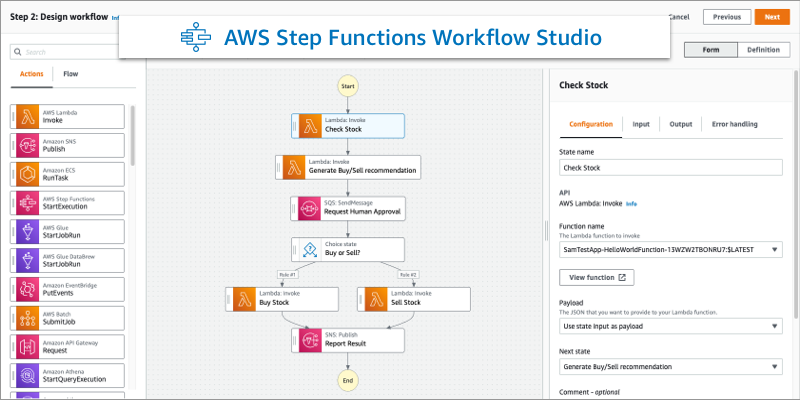
AWS Step Functions include a visual editor that enables users to design workflows, but it can quickly become cumbersome when dealing with complex business processes. While it offers a way to orchestrate tasks, its interface lacks the depth and clarity required for intricate workflows that involve numerous dependencies, decision points, and integrations.

Unlike more advanced business process modeling tools such as Camunda, AWS Step Functions do not provide a structured way to articulate inputs and outputs in a way that ensures transparency and maintainability. Additionally, it does not effectively encapsulate logic, making it difficult to manage state transitions, error handling, and process modifications at scale. This lack of a robust modeling framework can result in workflows that are harder to debug, optimize, and evolve over time, especially in enterprise environments where flexibility and adaptability are crucial.


2. Rigid Sequential Flow

Although AWS Step Functions allow for the creation of sequential workflows, they fall short when it comes to handling more sophisticated orchestration needs. Their rigid structure makes it challenging to implement advanced process flows that require parallel processing, dynamic branching, asynchronous timers, or event-driven mechanisms such as interrupted message events. These limitations can create bottlenecks in scenarios where multiple tasks need to be executed simultaneously or when workflows must respond dynamically to external triggers.

In contrast, business process management (BPM) tools like Camunda are specifically designed to manage these complexities, offering built-in capabilities for orchestrating parallel paths, handling long-running processes, and incorporating human-in-the-loop interactions. This flexibility makes BPM platforms a more suitable choice for enterprises looking to automate real-world business processes that demand scalability, adaptability, and precise execution control.


3. Inadequate Timeout Management

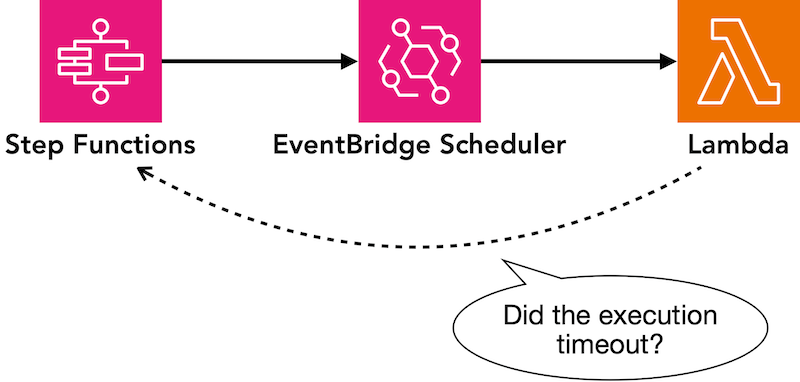
While AWS Step Functions provide basic timeout mechanisms, they lack the sophistication needed to manage more complex timeout scenarios, such as non-interrupting timeouts or escalation triggers based on predefined timers. This limitation can pose challenges for workflows that require nuanced timing controls, such as notifying a supervisor before a task reaches a hard deadline or escalating stalled processes without prematurely terminating them. As a result, businesses often find themselves forced to develop custom workarounds, adding unnecessary complexity and technical debt to their automation efforts.

By leveraging robust business process management (BPM) tools, organizations can implement these advanced timing features natively, ensuring more efficient workflow execution. Consulting services like Capital BPM specialize in optimizing process automation by utilizing BPM platforms that inherently support flexible timeout handling, reducing the need for costly and time-consuming custom development.


4. Insufficient Exception Handling

While AWS Step Functions offer basic timeout mechanisms, they struggle with more advanced scenarios like non-interrupting timeouts and escalation triggers based on timers. This limitation makes it difficult to manage workflows that require proactive notifications or escalations without prematurely terminating tasks. Businesses often end up building custom solutions, adding unnecessary complexity and technical debt.

By using process automation platforms, organizations can handle these advanced timing needs natively, ensuring smoother workflow execution. Consulting services like Capital BPM help businesses implement robust workflow automation solutions that eliminate the need for costly custom development while improving efficiency and scalability.


5. No Support for Compensation Events

Compensation events—critical for properly reversing transactions in complex workflows—are not natively supported by AWS Step Functions. This limitation makes it challenging to handle scenarios where certain steps need to be undone selectively without rolling back an entire process.

Effective business process modelling platforms, however, offer built-in support for compensation events, allowing businesses to manage these situations seamlessly. This capability is essential in complex environments where precise transaction control is required to maintain accuracy, compliance, and operational efficiency.


6. Lack of Native Versioning

AWS Step Functions do not support running multiple process versions concurrently, which is a standard capability in process mapping tools. This restriction makes it difficult to deploy updates without disrupting existing workflows, forcing businesses to choose between immediate cutovers or complex workarounds.

In contrast, workflow programs allow different process versions to run simultaneously, ensuring smooth transitions during updates. This flexibility is crucial for enterprises that frequently refine their processes, minimizing downtime and reducing risks associated with workflow changes.

7. Minimal Reporting and Analytics

While AWS Step Functions offer basic monitoring through CloudWatch, they lack the detailed reporting capabilities provided by workflow automation tools. This limitation makes it difficult to track process inefficiencies, identify delays, and optimize execution based on real-time data.

With workflow process mapping in platforms like Camunda, organizations can gain deeper insights into bottlenecks, performance trends, and cost analysis. These advanced reporting capabilities enable continuous improvement, helping businesses refine their processes, enhance efficiency, and make data-driven decisions.


8. Static Processes

AWS Step Functions – best suited for static, predefined workflows – is less adaptable to dynamic business needs. As organizations grow and evolve, rigid workflows can become a bottleneck, requiring costly modifications or workarounds to accommodate new requirements.

BPM consulting services like Capital BPM help ensure that your processes remain flexible and scalable, allowing for seamless adaptations without incurring technical debt. By leveraging advanced workflow automation strategies, businesses can future-proof their operations and maintain agility in an ever-changing landscape.


9. No Built-In Rule Engine

A robust rule engine, found in tools like Camunda, separates business logic from execution logic, allowing for precise updates without affecting the entire system. This modular approach enhances flexibility, making it easier to adapt to changing business requirements with minimal disruption.

In contrast, AWS Step Functions require monolithic redeployment for even minor updates, leading to inefficiencies and increased development overhead. This limitation makes them less suitable for dynamic business environments where agility and quick iterations are essential.


10. Complex Event Handling

AWS Step Functions support some event triggers, but implementing nuanced event-based functionality often requires extensive custom coding. This adds complexity and increases the risk of inconsistencies, making it harder to scale and maintain event-driven workflows efficiently.

In contrast, workflow automation platforms provide a standardized approach to event handling with predefined event types and configurable options. This simplifies implementation, reduces development overhead, and ensures a more consistent, scalable solution for managing complex business processes.


Why Camunda and BPM Tools Are Better Alternatives

Leading workflow automation platforms like Camunda provide comprehensive business process modeling capabilities to address complex organizational needs. These platforms offer a structured approach to designing, executing, and optimizing workflows, ensuring consistency and efficiency across business operations.

With features such as native versioning, compensation events, and advanced exception handling, Camunda enables businesses to maintain adaptable and scalable processes. This flexibility ensures that workflows can evolve seamlessly with changing requirements, reducing technical debt and enhancing overall operational agility.


A Better Approach: Combine AWS Step Functions with BPM Tools

AWS Step Functions excel at executing atomic actions, but they are not designed for end-to-end process orchestration. By integrating AWS Step Functions with BPM tools like Camunda, organizations can achieve the best of both worlds. BPM consulting services can help you design a hybrid solution that leverages the flexibility of workflow automation tools while taking advantage of the efficiency of AWS Step Functions for individual tasks.

This approach ensures your organization is equipped to handle changing business needs while maintaining scalability and operational efficiency. Don’t settle for a limited solution—invest in tools that can grow and adapt with your business.

Want to learn more? Click here to meet with our team to discuss migrating to better BPM options like Camunda.

The Practicality of AI in Prescription Processing

The Challenge of Handwriting in Medical Prescriptions

In the realm of healthcare automation, we often encounter complex challenges that require balancing accuracy, efficiency, and practicality. One such challenge is the interpretation of handwritten prescriptions. While electronic prescription systems exist, many doctors still rely on handwritten notes, leading to potential misinterpretations and errors in medication processing.

To address this, we designed a solution leveraging AI—specifically Claude—to analyze prescriptions received via email. The AI attempts to extract the medication information and matches it against a list of legal medications. If it finds a match, the prescription is sent to the pharmacy. However, a key challenge arises: sometimes, the AI cannot confidently determine what the doctor has written due to poor handwriting.

AI can sometimes have a hard time reading what the doctor has wrote due to bad handwriting.

The False Negative Approach

In response, we implemented a process where AI makes an educated guess and then generates a verification request for the doctor. If the doctor does not explicitly confirm the AI’s interpretation within 24 hours, the request is canceled. This ensures that no incorrect prescriptions are fulfilled while still enabling automation in a field where errors can have life-threatening consequences.

This approach follows a false-negative model rather than a false-positive one. In other industries, such as retail, a false-positive approach might be acceptable—if a customer orders potatoes and they’re out of stock, the system might suggest an alternative. However, when it comes to automation in healthcare, prescribing the wrong medication is not an option. Ensuring accuracy, even at the expense of some efficiency, is paramount.

Some think adding a digital input system is the ideal solution, but it can be very timely.

The Alternative Perspective: Why Not Just Use a Digital System?

A reasonable counterpoint to this approach is: Why use AI for handwriting analysis at all? Wouldn’t it be better to implement a structured digital input system for prescriptions, eliminating errors from handwriting altogether?

While this is an ideal solution, the reality of healthcare systems complicates matters. Implementing a new UI for prescription entry would require extensive stakeholder buy-in, approvals, and training, which could take six months or more. During this time, the existing manual process—with all its inefficiencies—would continue.

Instead, by leveraging AI alongside workflow automation tools like Camunda, Intelligent Document Processing (IDP), and Robotic Process Automation (RPA), we built a functional prototype in just six weeks. This solution automates six integrations, freeing up three full-time employees from tedious manual work such as managing emails, entering data into Excel, and making follow-up calls.


The Concept of Temporal Architecture

This approach aligns with the principle of temporal architecture—solving the problem as it exists today rather than waiting for an ideal future state. While a structured prescription entry system is the right long-term solution, the AI-based approach provides immediate value, improving efficiency and reducing errors in the interim.

A pragmatic engineer focuses on solving real-world problems with immediate, actionable solutions, while a scientist strives for the perfect theoretical solution. There is an intersection where practical solutions can be built elegantly, and that’s where technologies like Camunda shine. They allow rapid development, iteration, and continuous optimization, ensuring that solutions evolve based on real-world feedback.

Utilizing an AI-driven approach provides significant benefits in the present.

Engineering vs. Science: The Iterative Path to Perfection

The beauty of process automation is in its iterative nature. By deploying a working solution quickly, we gain valuable insights and user feedback that guide future improvements. This kinetic approach—building, delivering, and refining—ensures that users see the solution in motion and can provide informed suggestions.

In the end, the structured digital system for prescription entry is where we should be headed. However, until we reach that point, an AI-driven approach provides significant benefits today. It’s a step toward the ideal, implemented in a way that is both practical and impactful.

This discussion is open-ended—there are always improvements to be made and perspectives to consider. What do you think? How would you approach this challenge and provide top-notch healthcare automation solutions?

Want to learn more? Head to CapBPM.com/Contact to talk with our team of Camunda Experts about solutions like this!

Take Your Critical FinTech Processes to the Next Level with BPMN

Exploring “Ready-to-Use” Marketplace Blueprints

Sometimes in life, when you take the time to think about a question, you realize you already know the answer. The same is true in business. When you take a moment to really understand the problem and combine that with your expertise, you often figure out what the solution should be. 

If you use something like BPMN, which is designed to clearly explain business problems & solutions, you often find that you already know the answer. That’s because BPMN is naturally collaborative. It helps everyone in the organization see how different roles and systems work together to reach a goal. This builds agreement across the team.

Now, imagine applying this approach to specific areas like financial services. What if we created detailed, ready-to-use solutions for common FinTech issues? Well, we did.

Why “Ready-to-Use” is the Smarter Choice

1. Immediate Deployment

Start by kicking the tires on day one. Building solutions like Income Verification, Document Validation, Loan Origination, and Fraud Detection from scratch can take months of development, testing, and refinement. 

This not only delays your time-to-market but also erodes enthusiasm, introduces the risk of unforeseen challenges, and can derail your project. 

Expertly developed ready-to-use solutions integrate seamlessly into your existing systems, getting you to the coding level within days. This means you can start leveraging the power of automated processes almost immediately.

2. Proven Reliability

You don’t have to reinvent the wheel. Customizable ready-to-use solutions incorporate best practices and compliance with industry standards. They offer the flexibility to customize at key points, then they meet your unique needs while reducing the risk of errors or omissions that could have significant consequences.

3. Cost Efficiency

Developing a custom solution not only incurs direct development costs but also ongoing expenses related to maintenance, updates, and potential rework. Ready-to-use solutions eliminate much of this overhead, delivering a higher return on investment. Your team can focus on enhancing the solution rather than starting from scratch, allowing you to allocate resources more effectively.

The Industry Solution Advantage

1. Deep FinTech Expertise

In the FinTech industry, understanding the unique challenges and opportunities is crucial. Industry solutions are built by experts with a deep understanding of financial services. This ensures that they address the specific needs of the sector. No matter the blueprint you choose (income verification, document verification, loan origination, or fraud detection), these solutions are not just tools. They are backed by a wealth of knowledge and experience that guide you through the complexities of each process.

2. Accelerated Time-to-Market

Getting your product to market quickly can be a significant competitive advantage. By opting for a ready-to-use solution, you dramatically shorten your development timeline, allowing you to focus on refining your offering rather than getting bogged down in foundational work. This acceleration not only saves you money but also positions you to respond to market demands faster, ensuring that you stay ahead of the competition.

Start Today

Choosing a ready-to-use FinTech solution built on BPMN is a strategic move to transform the way you approach challenges like income verification, document verification, loan origination, and fraud detection. It’s about saving time and money, but it’s also about delivering a robust, reliable solution, thus enhancing your customer’s experience and strengthens your market position.

Don’t let the complexities of custom development slow you down. Leverage the best of industry solutions to take your critical FinTech processes to the next level—quickly, efficiently, and with confidence. Build on a solid foundation to undoubtedly find that you can’t help but focus on the important things.

Demo our Income Verification Process Blueprint

Our Income Verification process blueprint in Camunda Marketplace empowers businesses to improve their process orchestration by automating and streamlining income verification workflows. By leveraging Camunda’s powerful workflow automation capabilities, this solution reduces manual effort, minimizes errors, and accelerates decision-making, allowing you to focus on higher-value tasks.

With enhanced efficiency and accuracy, your organization can handle income verification faster and more reliably, ultimately improving customer satisfaction and operational performance. Ready to see it in action? Request a demo today to experience the benefits firsthand!

Legacy Systems vs. Camunda

Exploring the Key Differences Between Camunda and its Competitors


What are the main advantages of choosing Camunda over platforms like Pega, IBM, or Appian when migrating from legacy systems? 

That’s a really excellent question. There are a couple of very important takeaways.

First, those systems are sort of unified, right? You do Pega UI, Appian UI or you do the code framework in IBM.  What that means is that if you want to change something simple, for example, you can’t just throw one of your first or second year Angular programmers at it — you have to get an expert in that field. Now, that not only comes at a premium, but it’s very difficult to grow in house. You have to go and make sure that they make the changes because they could inadvertently break something else since it’s all unified. 

The second thing is obviously cost. You’re paying so much more for those systems than you would be paying for an open source system, even if that open source system has an enterprise version like Camunda does. 

Finally, you’re just getting much, much better execution. Camunda is a leaner machine. It’s more performance, faster, scales better, and simpler to maintain. Camunda is an order of magnitude difference. It’s just more performance, and that’s not magic. It is not because the Camunda engineers are so much smarter than everyone else’s engineers. The reason is because Camunda, for the most part, really focuses on a pure execution engine. They make race cars, and those race cars go really fast; they don’t try to become SUVs, boats and planes. There aren’t any better process mapping engine out there. They’re really good at executing BPMN and DMN. That’s what they do. It’s all they do. And that, in itself, is liberating.

That makes sense, but the way I see it, it sounds sort of unrealistic to imagine it being an easy process to move to Camunda. Am I right in assuming that? 

Yes and no. You’re right that there is a lot of complexity involved in interpreting a Pega UI as an Angular front end, or a React front end, and then reimagining all that. However, that’s a place where I can be slightly self promotional and say the CapBPM actually has automated migration tools. We have an entire six-year old product line called Exodus. It actually reads the detailed exports of Pega, Appian, IBM, and it translates them into corresponding command code. And when I say it translates them, I don’t mean that it just translates a BPM diagram to a BPM diagram. I mean, it does the UI, events, rules, logic, and so much more. It does the entirety of the process. Trust me, I know it is a big claim, and I invite anyone who doubts it to test it more. 

From our perspective, we are happy to do this on a success-based model, and we are happy to demonstrate how it works. We think that you should have open borders when it comes to your enterprise software, and if you want to go somewhere else, you should not be practically prohibited from doing so from the complexity that’s built into some of these legacy applications. You should explore business process mapping tools that don’t restrict your capabilities.

So regarding Exodus, how does one typically get started with a process migration? 

Basically, we do an interview with you, and then based on that, we work with you to execute a series of steps to create artifacts for Exodus. For example, if it’s an IBM BPM file or IBM BPM project, our tools can parse through that, translate it into corresponding Camunda, and then even test that Camunda using an AI engine to make sure that it has fidelity to the original process. It’s a really impressive process, and I really love showing it to people. I especially love showing it to people who understand BPM, because they’re the ones who are really educated enough to understand what it is that they just saw.

Camunda 8 vs. Camunda 7

As a business leader, I want to understand why my organization should consider upgrading to Camunda 8. What are the key advantages it offers over Camunda 7?

So, Camunda 8 brings significant technical advantages that organizations should really consider. It introduces a revamped execution engine that leverages cutting-edge technologies and architectural improvements. This engine enhances performance and scalability, enabling organizations to handle much larger process volumes and accommodate future growth. Basically, if you’re processing more than, let’s say, a thousand transactions per second, you should seriously think about Camunda 8.

Camunda 8 also introduces an updated user interface, offering improved usability and responsiveness. The UI experience is much better and more pleasant. You’ll be able to build forms and deliver them in a much more pleasing way.

Camunda 8 incorporates architectural enhancements to support cloud-native deployments. This means that it seamlessly integrates with technologies like Kubernetes and enables organizations to leverage the benefits of container orchestration and auto-scaling, using infrastructure as code. This is really the way to go if you want to utilize the native elements of the cloud.

But doesn’t Camunda 7 have more market share and adoption? Shouldn’t I go for the system that’s more widely used?

You are a hundred percent right that Camunda 7 has a stronger base of adoption. However, Camunda 8 is the future of Camunda. Cloud-based SaaS workflows as a utility is where the market is heading, and specifically, that’s where Camunda is going. You have to think about where you want to be in the future. You don’t want to be Blockbuster; you want to be Netflix. The reality is that Camunda is investing heavily in Camunda 8. If you’re thinking about where we are currently, it may make sense to go, “Oh, well, Camunda 7 has more adoption and there’s more knowledge out there on how to work with it.” But if you’re thinking about where you’re going to be three or five years from now, the future is Camunda 8.

That sounds compelling, but I’m concerned about the migration process from Camunda 7 to Camunda 8. What are the key considerations and challenges involved in upgrading?

One important thing you have to think about is the compatibility of your existing processes and customizations with the new version of Camunda 8. Camunda is trying to maintain backward compatibility, but I can tell you from personal experience that it’s not 100% guaranteed. If you’re transitioning from 7 to 8, you have to be careful. You should consider getting someone who has experience with this transition to help. It doesn’t have to be us, but it should be someone who fits our profile.

It’s also important to plan for a phased migration to minimize disruption to ongoing operations. Usually, this means, for example, using a router or load balancer in front of the applications, where existing applications go to your Camunda 7 instance and new applications go to your Camunda 8 instance. Eventually, you can phase out the Camunda 7 instances and fully transition to Camunda 8.

If you have concurrent limitations happening, it becomes crucial to manage the transition smoothly.

How does Camunda support organizations in their adoption of Camunda 8 and the transition from Camunda 7 from a technical standpoint?

Camunda deserves kudos for their excellent support in this regard. They provide extensive technical support and resources to help customers facilitate the adoption of Camunda 8. They often assign an expert to work closely with you, offering a comprehensive migration guide and guiding you through the process. They also have dedicated support channels, including free community forums and professional services support, to ensure that customers feel supported and comfortable throughout the transition.

Additionally, organizations like ours can assist you through the process and provide dedicated support. It’s worth noting that when Camunda releases updates, fixes, features, and integrations, they prioritize Camunda 8 before Camunda 7. So, you need to think not just about where you are, but where you want to be. There are problems that may be challenging to solve in Camunda 7 but become easier in Camunda 8, which makes the transition even more compelling.

Camunda Adoption

What to Know When Adopting Camunda 8

When adopting Camunda for our organization, what specific challenges or pain points should we consider addressing?

When you’re considering Camunda adoptions, you should carefully look at your pain points and challenges. For example, if your organization faces manual and time-consuming approval processes, Camunda is a really good automation framework for that sort of thing.

It can help you streamline processes by automating tasks, assignments, approvals, and notifications. It’s really, really good at that, and that reduces manual errors, reduces bottlenecks, and improves your overall turnaround time. Camunda can help you pull complex and fragmented workflows into an orchestrated solution.

So, just like an orchestra conductor, you can take a little bit from here, a little bit from there, put it all together, and create music with all of that. If you’re visually representing your solution, especially if it’s a complex workflow, it’s much more likely that you’re able to see what’s wrong and able to fix it.

You also need to think about the real-time visibility of the dashboards that you need to provide. So, you need to think about what information you need to know to determine your success in your orchestration. Who’s going to provide that information? Who’s going to consume that information? Get a real sense from your users, consumers, and leadership in terms of how they want to use Camunda.

What should organizations keep in mind when integrating Camunda within their existing infrastructure?

Integration is a critical consideration when you’re adopting Camunda. Organizations need to assess the technical requirements and compatibility with their existing infrastructure.

For example, if you’re already a Java shop, in case you are, then if you’re using Camunda 7, you may want to think about deploying Camunda as a Spring Boot application. On the other hand, if you’re going to be using Camunda 8, then you can think about it as a sort of headless utility that you can utilize using RESTful APIs.

That becomes part of how you set up your connections. And for that matter, if you do that and you have an API management system like Apigee, MuleSoft, or Kong, that’s going to serve you really well. You also need to think about how you’re going to deal with synchronous and asynchronous messaging.

Are you going to use Apache Kafka or something along those lines so that you can integrate with systems like SAP, Salesforce, and others? To ensure successful integrations, you should evaluate factors such as network connectivity, security protocols, and the scalability of both your backend systems and the needs of your workflow.

It’s really essential to work closely with the IT team and the security team to assess infrastructure readiness. Make sure that you’re not introducing change that’s unsupportable by the larger organization. In this context, for example, you need to think about what your patching strategy, upgrade strategy, and disaster recovery strategy is going to be like.

You’ve got to work with a partner that understands these things. Now, when I say work with a partner, I don’t necessarily mean that you have to hire someone like us. However, you should definitely work with someone who’s done this before. I think those are the key things that you want to think about, in addition to the obvious things like security and compliance.

Camunda actually has very good security features, including data encryption, access control, and authentication mechanisms. You just need to make sure that you’re ready to integrate with us.

Change management is often a critical aspect of any new technology adoption. How can organizations effectively manage the transition to Camunda and ensure widespread adoption?

That’s a really pivotal question, and it’s going to be key to success. What you need to do is think about the impact of Camunda on employees, processes, and the overall organization. For example, we’ve implemented Camunda where the front-end people who are using it didn’t even know that they were using a workflow engine.

They were used to, for example, checking items into SharePoint that had the right information for a loan application. From Camunda’s perspective, what we did was set it up so that Camunda was listening for that check-in. Then from there, we extracted key data from the Excel file that was uploaded. Using that. we trigger a process that would message back to the person and ask them questions. “Can you confirm the annual income? Do they have three years of employment?” Whatever that may be.

What you want to do is make sure you’re making as little of a disruptive splash as possible when you’re engaging your existing people. You also want to make sure that you get stakeholder engagement right. You want to make sure stakeholders across various departments understand what the value is and that you have their buy-in. If you don’t, you’re going to have a bad time.

You also want to have comprehensive training programs. Especially for your business users who are going to be articulating your processes. They have to know how to write diagrams that meaningfully convey both their problems and the solutions that they want you to influence.

You have to have change champions. These are people within the organization that can advocate for process adoption. People that have the support of their peers in the transition, and can actually share success stories. You have to think about continuous support, and always be able to log bugs. You’ve got to be able to fix things, and you’ve got to do all that in a way that’s non-disruptive.

Finally, you’ve got to have your KPIs well defined. KPIs obviously being key process indicators. You have to make sure that you’re measuring things that are meaningful and not just vanity statistics. Monitor those regularly, and evaluate the impact of the adoption. Make sure the things that you’re measuring are actually things that matter to your organization. And you may find that that’s a temporal truth.

Things that matter to you at the beginning are not necessarily things that are going to matter to you six months or a year in. If that’s the case, you’ve got to have the flexibility of mind and culture to be able to change and measure new things that potentially mean more as you go through the process.

Business Leaders and Camunda

Enabling Collaboration Between Business and IT

Let’s say I’m a leader on the business side, although not directly involved in IT operations. However, I do collaborate with the IT department. Why should I care about whether they use Camunda or another technology? Shouldn’t the tech stack be invisible to me?

One could argue that as the driver of a car, you don’t need to know the specifics of the spark plugs or the motor’s color. However, the answer is yes, you should know. If the car has the right spark plugs, appropriate fuel, and well-designed internal engines to support you, you would want to be aware of it.

The same applies to workflow tools like Camunda. When you can see the sequence of steps, how exceptions and escalations are handled, and how the IT side aligns with your requirements, it enables you to ensure they are fulfilling your expectations.

Collaboration and connection between the business and IT are essential. You should encourage discussions about specific technology choices and how they contribute to improved performance, efficiency, and innovation. An executable diagram provides consensus on what is happening, who is involved, duration of tasks, and how exceptions, timeouts, and escalations are managed.

If the IT side presents you with stacks of code, making it difficult to comprehend, it’s understandable that you may feel overwhelmed. In such cases, you may realize that you should be on the IT side of things. However, if they present a clear diagram that you can trust, demonstrating their current activities, it becomes a powerful tool. This addresses the notion that the tech stack should be invisible, as it highlights the potential benefits of different technologies and how they support your objectives.

How can the utilization of Camunda or other technologies in the IT stack impact overall business operations and outcomes?

Camunda specifically, and BPMN (Business Process Model and Notation) in general, are scientific in nature, derived from the scientific process we learned in fifth grade. You have a hypothesis, measure the results, and potentially adjust the experiment accordingly.

When you utilize a tool like Camunda, it reveals valuable information. For instance, you can observe that the loan application is first processed by the first-tier loan officers, typically sitting in their queue for 12 hours before they start working on it, sometimes requiring additional interactions. This information tells you that you need to reduce the application’s waiting time or improve the clarity of the questions asked. It helps you identify areas for improvement, prioritize efforts, and enhance overall outcomes.

We must remember that the goal is to improve the overall outcome, while BPM and other tools are merely tactical means to achieve that. By using the right tool, you can keep your focus on the big picture of the business problem you are solving. Tools like Camunda provide visibility into the process, allowing you to apply your expertise and efforts where they will have the most impact.

As a business leader, what specific advantages can I gain by being informed about the technology choices made within the IT department?

If you are aware, for example, that the IT department can securely and efficiently interact with a particular database, completing tasks in a specific timeframe, you can understand their challenges. When they request budget for improving performance, you can comprehend how it will affect the bottom line. Otherwise, it may seem like a guessing game, with them requesting funds and providing technical jargon that doesn’t make sense to you. Understanding their choices and how they align with return on investment and key process indicators empowers you to make informed decisions.

Can you provide examples or insights into situations where the choice of technology like Camunda has directly impacted business outcomes or processes, either positively or negatively?

Certainly. Let me share a couple of examples. In a large retailer, we built a new hire onboarding process. Initially, we had applicants fill out an application and simultaneously conducted background checks for criminal history while sending them a voucher for a drug screen. However, it turned out that the drug screen vouchers were expensive. The business intervened and recommended that the drug screen should only be conducted if the background check passed. This adjustment saved significant costs without compromising efficiency.

In another case, we developed a system for monitoring refrigeration units in retail stores. If a unit failed, the system would assess the inventory and coordinate appropriate technicians based on the nature of the problem. By involving the business and showing them the system’s capabilities and business rules, they provided valuable insights. For instance, they highlighted the need to consider specific factors, such as holidays, when scheduling repairs in different locations. This collaboration allowed us to prioritize efforts and focus on problems that mattered most to the business.

Overall, it’s crucial to understand how technology choices impact business outcomes and processes. Camunda, along with BPMN, enables transparency and collaboration between the business and IT departments, facilitating better decision-making and driving positive results.